Nexus: An Agentic RAG Assistant for ResilientDB and Distributed Systems
Overview
Nexus is a Next.js-based agentic Retrieval-Augmented Generation (RAG) assistant tailored for Apache ResilientDB, blockchain, and distributed systems. It combines LlamaIndex (TypeScript) orchestration, DeepSeek for reasoning, Gemini Embedding 001 for retrieval, and Supabase (Postgres + pgvector) for persistent storage and memory, delivering grounded answers with clear citations.
Motivation
- The research landscape is dense; answers must be verifiable and source-linked.
- Traditional keyword tools don’t synthesize across documents.
- Researchers need multi-document reasoning, persistent context, and the ability to pull in external updates when needed.
Key Features
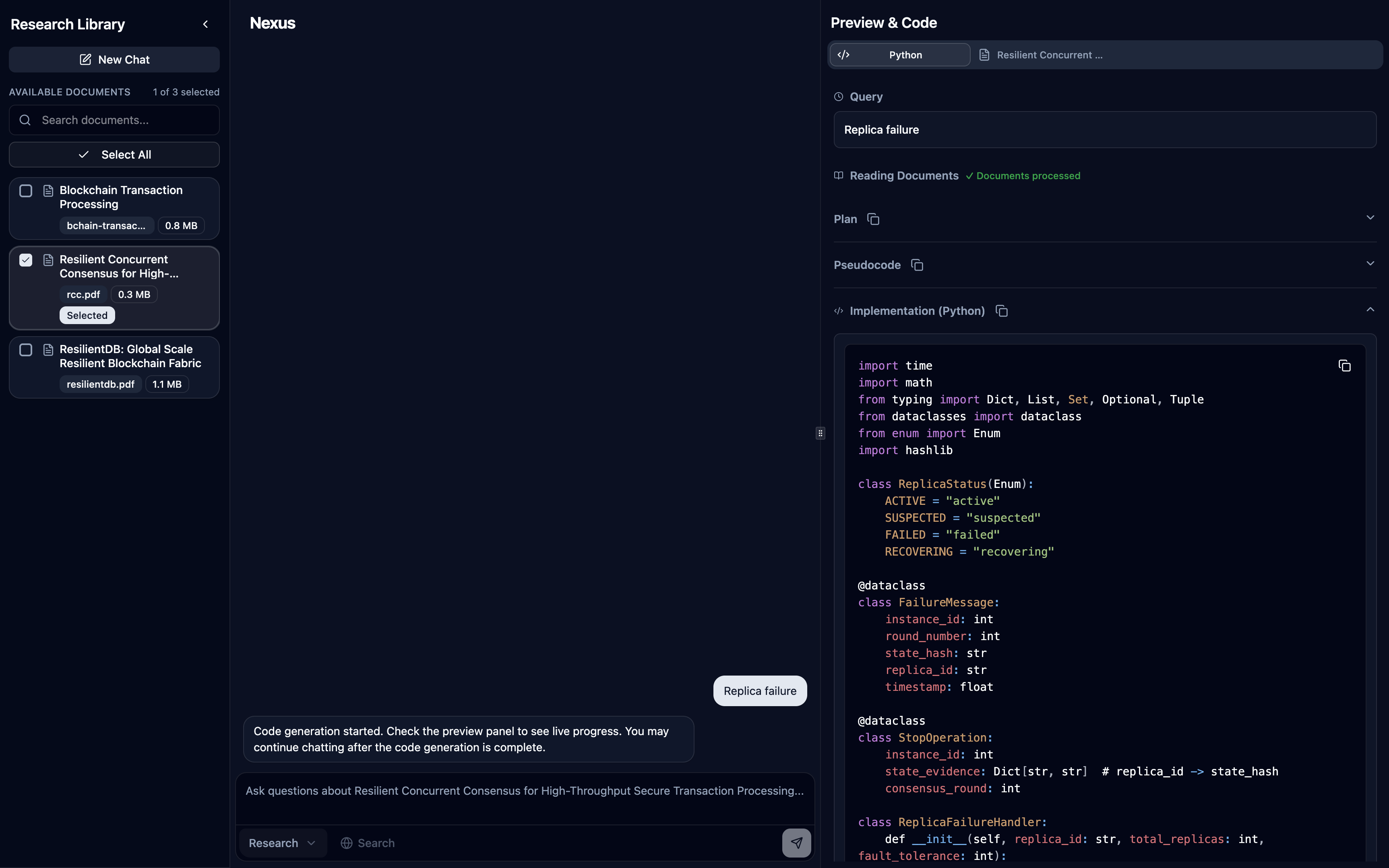
- Research and Code modes:
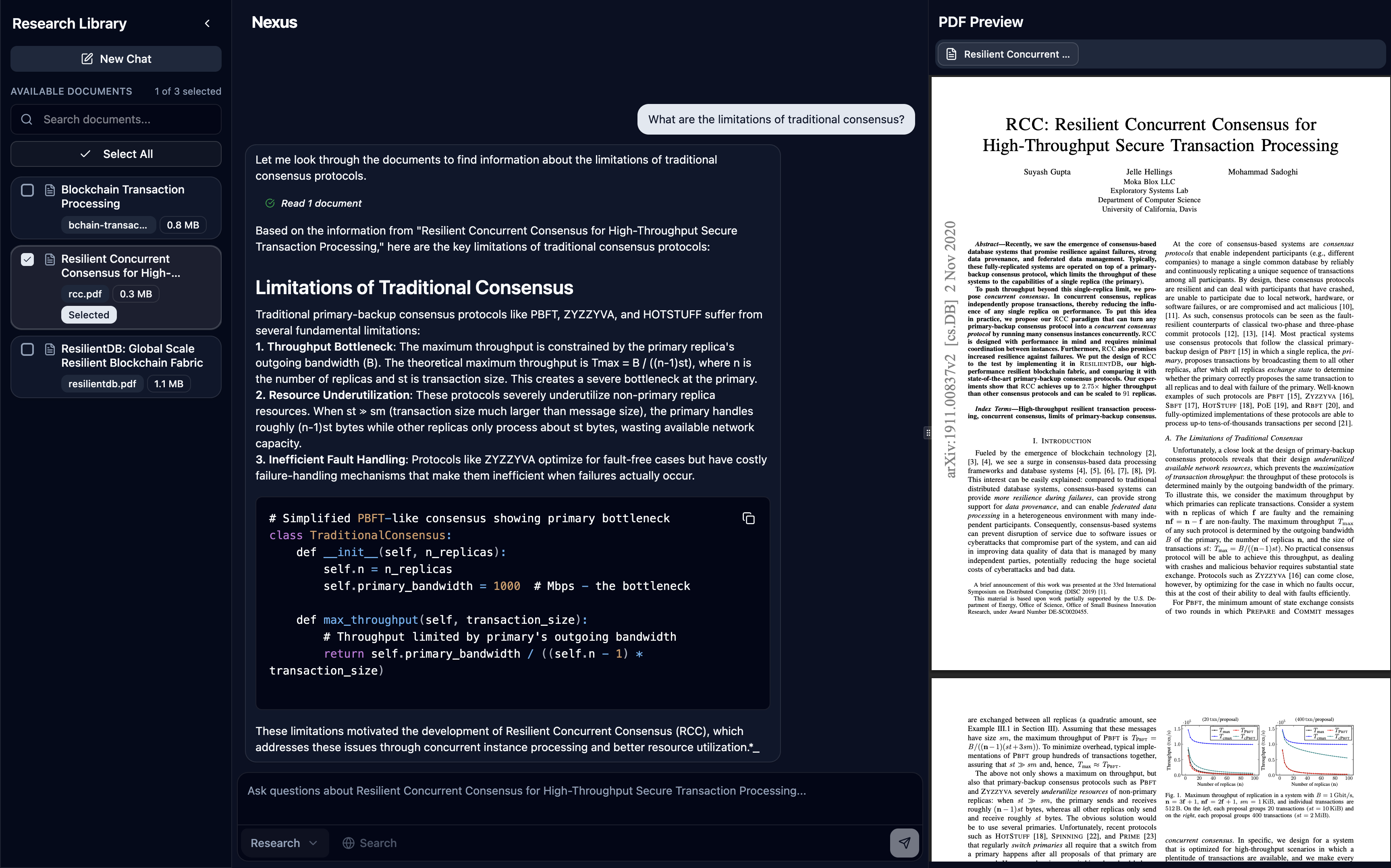
- Research Mode: Single
NexusAgentwithsearch_documentsandsearch_webtools, streams tool usage transparently and surfaces source badges in the preview panel (inline footnotes are on the roadmap) - Code Mode (experimental): Multi-agent workflow via
CodeAgentclass:PlannerAgent: Retrieves document content and analyzes for implementation detailsPseudoCodeAgent: Creates structured pseudocode from research findingsCodeAgent: Generates final production-ready code in selected language (TypeScript, Python, C++)- Features automatic handoffs between agents and live streaming of each phase
- Research Mode: Single
- Document selection:
- Single-document focus for deep reading.
- Multi-document selection for synthesis and comparison.
- Tool-aware agent:
- search_documents: semantic retrieval from Supabase pgvector (scoped to selected docs).
- search_web: Tavily for up-to-date or out-of-corpus facts.
- Session-scoped memory with short-term and long-term capabilities:
- Short-term memory: FIFO queue of recent messages within token limits (30,000 tokens, 70% ratio for chat history)
- Long-term memory: Implemented via two memory blocks:
robustFactExtractionBlock: Extracts and stores durable facts using DeepSeek (max 10 facts, priority 1)vectorBlock: Stores and retrieves session-scoped memory in Supabase pgvector (priority 2, top-k=3)
- Streaming with tool transparency:
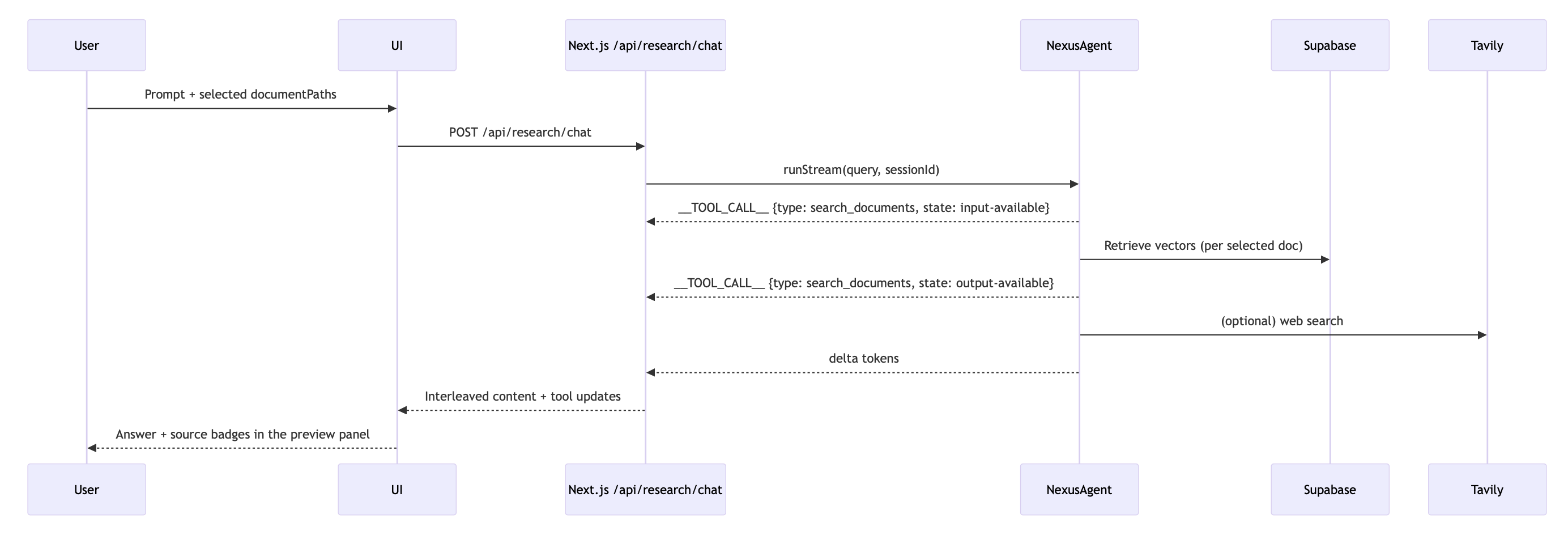
- The API streams deltas and tool lifecycle events so the UI can interleave “thinking” steps and tool badges.
System Architecture
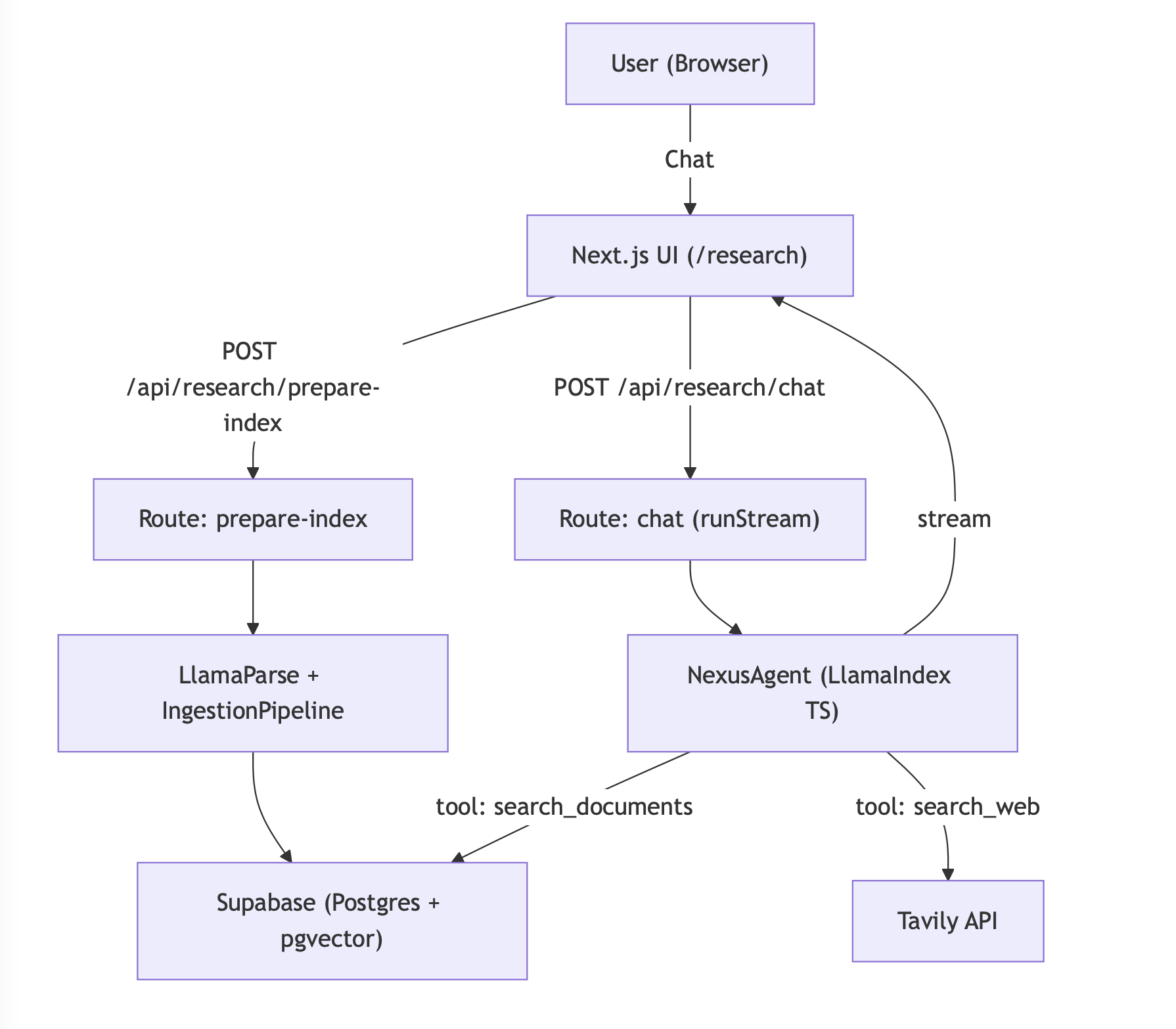
Ingestion Pipeline
Nexus implements a sophisticated document ingestion pipeline using LlamaIndex’s IngestionPipeline with multiple transformation stages to prepare raw PDFs for efficient retrieval:

Transformation Pipeline Details:
- Document Parsing:
LlamaParseReaderconverts PDFs to structured JSON with page metadata, handling complex layouts, tables, and figures - Node Parsing:
MarkdownNodeParserprocesses the markdown content from LlamaParse into structured document nodes - Text Chunking:
SentenceSplitterwith chunk size 768 tokens and 20-token overlap maintains semantic coherence while creating retrievable segments - Metadata Extraction:
SummaryExtractorautomatically generates summaries and extracts key metadata for each chunk - Embedding Generation: Gemini Embedding 001 converts text chunks into high-dimensional vectors for semantic similarity search
- Vector Storage: Embeddings and metadata are stored in Supabase pgvector with HNSW indexing for fast retrieval
Caching Strategy: The system maintains a parsed_documents table in Supabase to track parsing status, avoiding re-processing of already ingested files and enabling incremental updates.
This pipeline ensures that each PDF is transformed into semantically meaningful, searchable chunks with rich metadata and high-quality embeddings for precise retrieval.
Streaming and Tooling
Stack
- Frontend: Next.js (React) chat UI + PDF/source preview panel
- API: Next.js Route Handlers under /api/research/*
- Orchestration: LlamaIndex (TypeScript)
- Vector Storage: Supabase (Postgres + pgvector) via @llamaindex/supabase
- LLM: DeepSeek (deepseek-chat) via @llamaindex/deepseek
- Embeddings: Gemini Embedding 001 via @llamaindex/google
- Web Search: Tavily
How it Works (at a glance)
- Select documents (single or multiple).
- The UI calls /api/research/prepare-index → PDFs parsed with LlamaParse → transformed and embedded → stored in pgvector.
- Ask a question; the UI calls /api/research/chat → the agent chooses tools → streams tokens and events → UI displays content and source attributions.
Research Agent
Code Composer Agent
Run Locally
- Prerequisites:
- Node.js 18+
- Supabase project with pgvector enabled
- Create two tables (or reuse defaults):
- llamaindex_vector_embeddings
- llamaindex_memory_embeddings
- API keys:
- DEEPSEEK_API_KEY
- GEMINI_API_KEY
- LLAMA_CLOUD_API_KEY (for LlamaParse)
- TAVILY_API_KEY
- SUPABASE_URL and SUPABASE_ANON_KEY (or SUPABASE_SERVICE_ROLE_KEY)
- GOOGLE_CLIENT_ID, GOOGLE_CLIENT_SECRET, GOOGLE_REDIRECT_URI, GOOGLE_REFRESH_TOKEN (for Drive access)
- Environment
- .env.local
DEEPSEEK_API_KEY=...
DEEPSEEK_MODEL=deepseek-chat

GEMINI_API_KEY=...
LLAMA_CLOUD_API_KEY=...
TAVILY_API_KEY=...

SUPABASE_URL=...
SUPABASE_ANON_KEY=...         or SUPABASE_SERVICE_ROLE_KEY=...
SUPABASE_VECTOR_TABLE=llamaindex_vector_embeddings
SUPABASE_MEMORY_TABLE=llamaindex_memory_embeddings

GOOGLE_CLIENT_ID=...
GOOGLE_CLIENT_SECRET=...
GOOGLE_REDIRECT_URI=...
GOOGLE_REFRESH_TOKEN=...
- Install and run
npm install npm run dev open http://localhost:3000/research - Connect document sources
- Share the desired folders with the Google account tied to your refresh token.
- Update the folder IDs inside
src/app/api/research/documents/route.tsif you need different collections. - Uploaded PDFs in those Drive folders appear automatically in the in-app library once credentials are configured.
- Use the app
- Select one or more documents in the sidebar.
- Wait for “Preparing documents…” to complete (ingestion runs via /api/research/prepare-index).
- Ask questions. The agent retrieves from your selected docs and lists sources within the preview panel.
Memory Design (Session-Scoped)
Nexus implements the LlamaIndex Memory framework with both short-term and long-term memory capabilities:
Short-term Memory:
- Token-limited FIFO queue (30,000 tokens total, 70% allocated to chat history)
- When chat history exceeds the ratio, the framework automatically trims the oldest short-term messages while leaving long-term memory blocks intact
- Maintains recent conversational context within the session
Long-term Memory (via Memory Blocks):
robustFactExtractionBlock(priority 1): Extracts durable, reusable facts using DeepSeek LLM, stores up to 10 facts with automatic summarization when limit is exceededvectorBlock(priority 2): Stores and retrieves session-scoped memory batches in Supabase pgvector (keyed by sessionId), uses hybrid similarity search with top-k=3 retrieval
Benefits:
- Coherence across turns and sessions without relying on raw chat transcripts
- Scalable across instances via persistent vector storage
- Automatic memory management with priority-based truncation when token limits are exceeded
Current Limitations
- Code Mode is experimental and best for structured, implementation-focused prompts.
- Corpus is intentionally scoped to ResilientDB and related systems to ensure high-quality retrieval.
- Requires cloud APIs (DeepSeek, LlamaParse, Gemini, Tavily); offline mode is not supported out-of-the-box.
Future Work
- Inline citation markers and highlighting in the PDF preview panel
- Add [^id]-style footnotes to responses and allow clicking to jump to the referenced passage/page range.
- Custom selective context
- Let users include/exclude sections (e.g., Methods only), set per-query filters, or re-rank top-k nodes.
- Advanced reranking
- Integrate implementation-aware reranking for code-generation workflows (leveraging the CodeComposer pipeline).
- Multimodal parsing
- Tables, figures, and chart-aware extraction for richer question answering.
- Proactive discovery
- Recommend relevant new papers based on ongoing sessions and research interests.
Closing
Nexus brings together a modern TS-first stack, robust retrieval, transparent tool use, and session memory to create a reliable research copilot for distributed systems.