Introduction
GraphQ-LLM is an intelligent AI assistant that helps developers learn, understand, and optimize GraphQL queries for ResilientDB. Built with Retrieval-Augmented Generation (RAG) and integrated with the ResilientApp ecosystem, it provides real-time explanations, suggestions, and performance insights for your GraphQL queries.
🎯 What is GraphQ-LLM?
GraphQ-LLM is a comprehensive AI tutor that transforms how developers interact with GraphQL APIs. Instead of searching through documentation or trial-and-error query writing, developers can ask questions in natural language or paste their queries to get:
- Detailed Explanations: Understand what each query does, how fields work, and what to expect in responses
- Efficiency Metrics: See estimated execution time, resource usage, and complexity scores
- Documentation Context: Access relevant ResilientDB and GraphQL documentation through semantic search
🏗️ How It Works
Architecture Overview
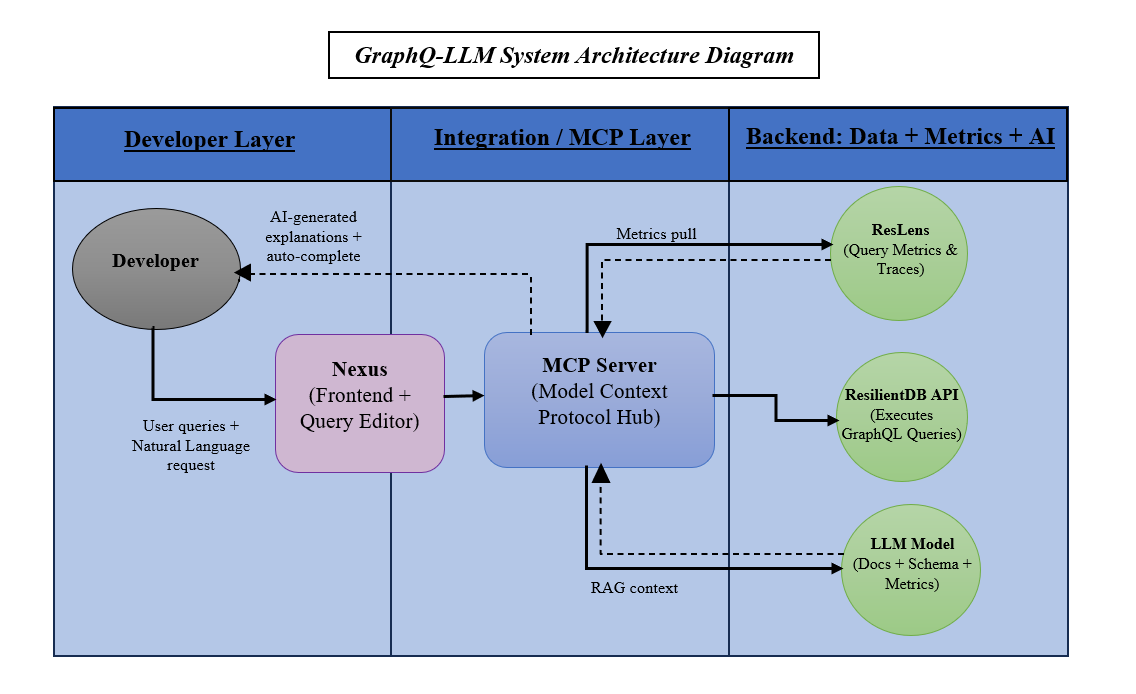
Core Components
- RAG System (Retrieval-Augmented Generation)
- Stores GraphQL documentation in ResilientDB with vector embeddings
- Uses semantic search to find relevant documentation chunks
- Combines retrieved context with LLM for accurate, contextual responses
- AI Explanation Service
- Detects whether input is a GraphQL query or natural language question
- For queries: Analyzes structure, fields, operations, and provides explanations
- For questions: Retrieves relevant docs and generates comprehensive answers
- Efficiency Estimator
- Calculates query complexity scores
- Estimates execution time and resource usage
- Provides real-time metrics when ResLens is enabled
🚀 Key Features
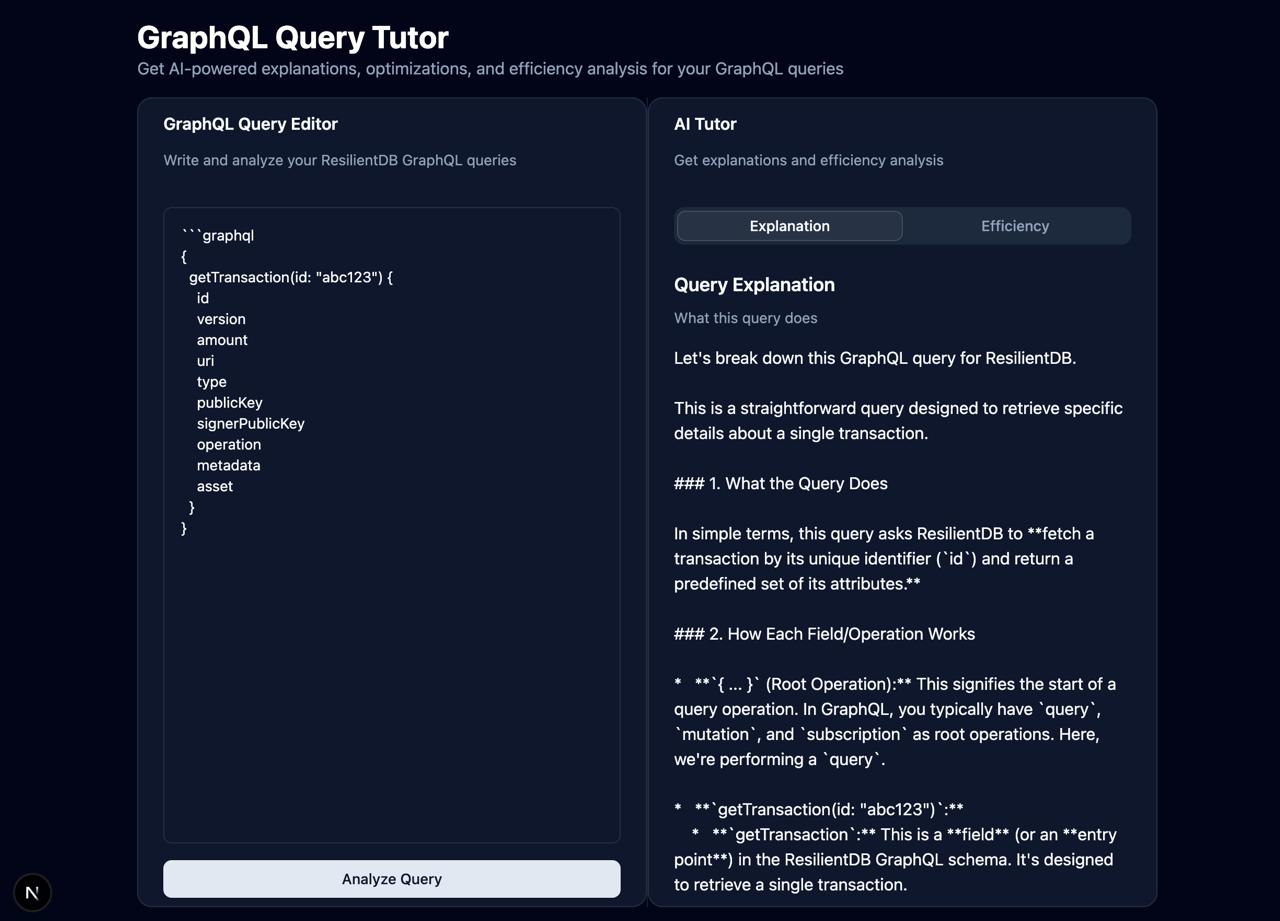
1. Intelligent Query Explanation
Paste any GraphQL query and get a detailed breakdown:
{
  getTransaction(id: "123") {
    id
    asset
    amount
  }
}
Response includes:
- What the query does (in plain English)
- How each field and operation works
- Expected response format
- Common use cases
2. Natural Language Q&A
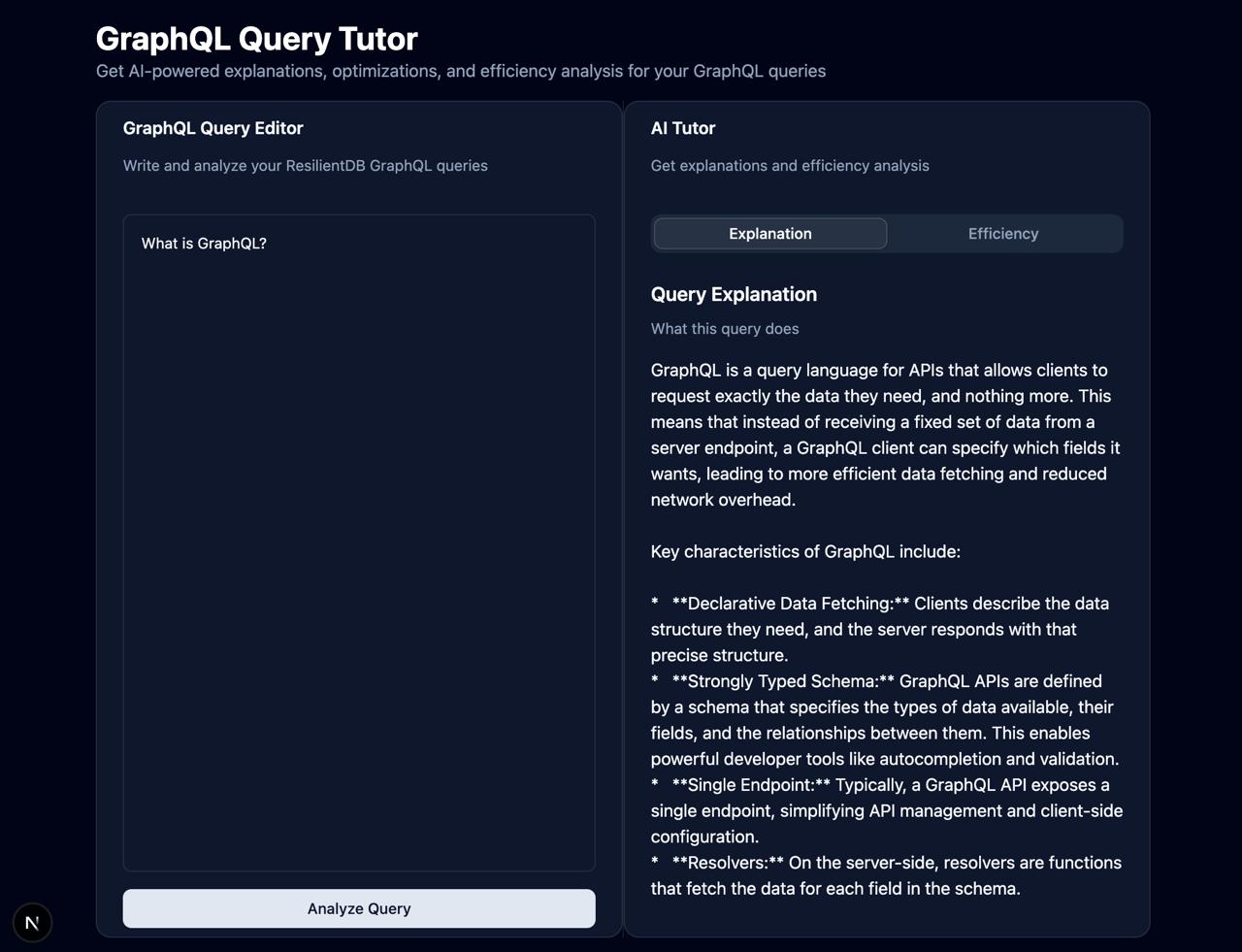
Ask questions like:
- “How do I retrieve a transaction by ID in GraphQL?”
- “What is the difference between query and mutation?”
- “How can I optimize my GraphQL queries?”
The system retrieves relevant documentation and provides comprehensive answers with examples.
3. Query Optimization Suggestions
Get actionable recommendations:
- Remove unused fields
- Use field aliases for clarity
- Add filters to reduce result size
- Optimize nested queries
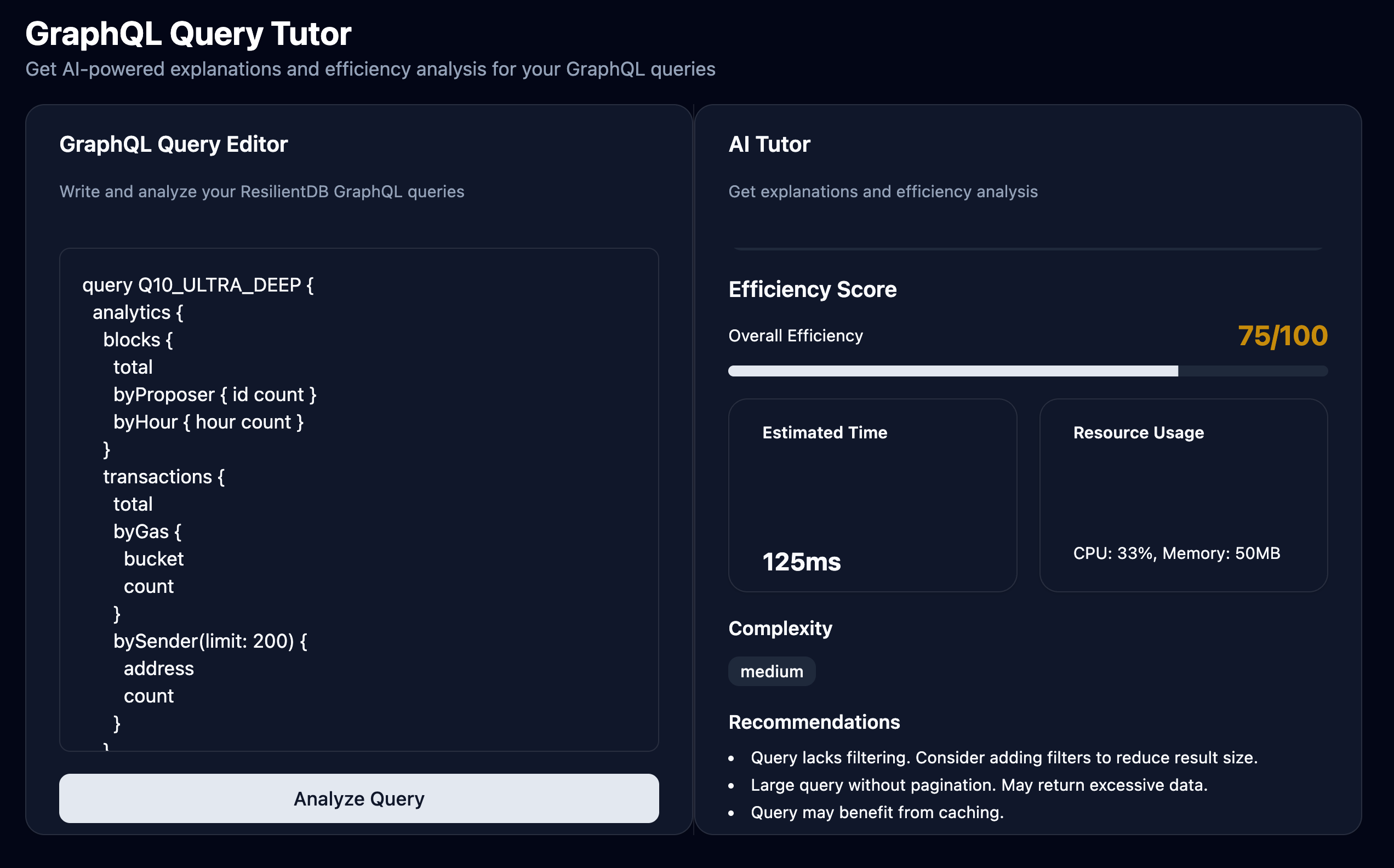
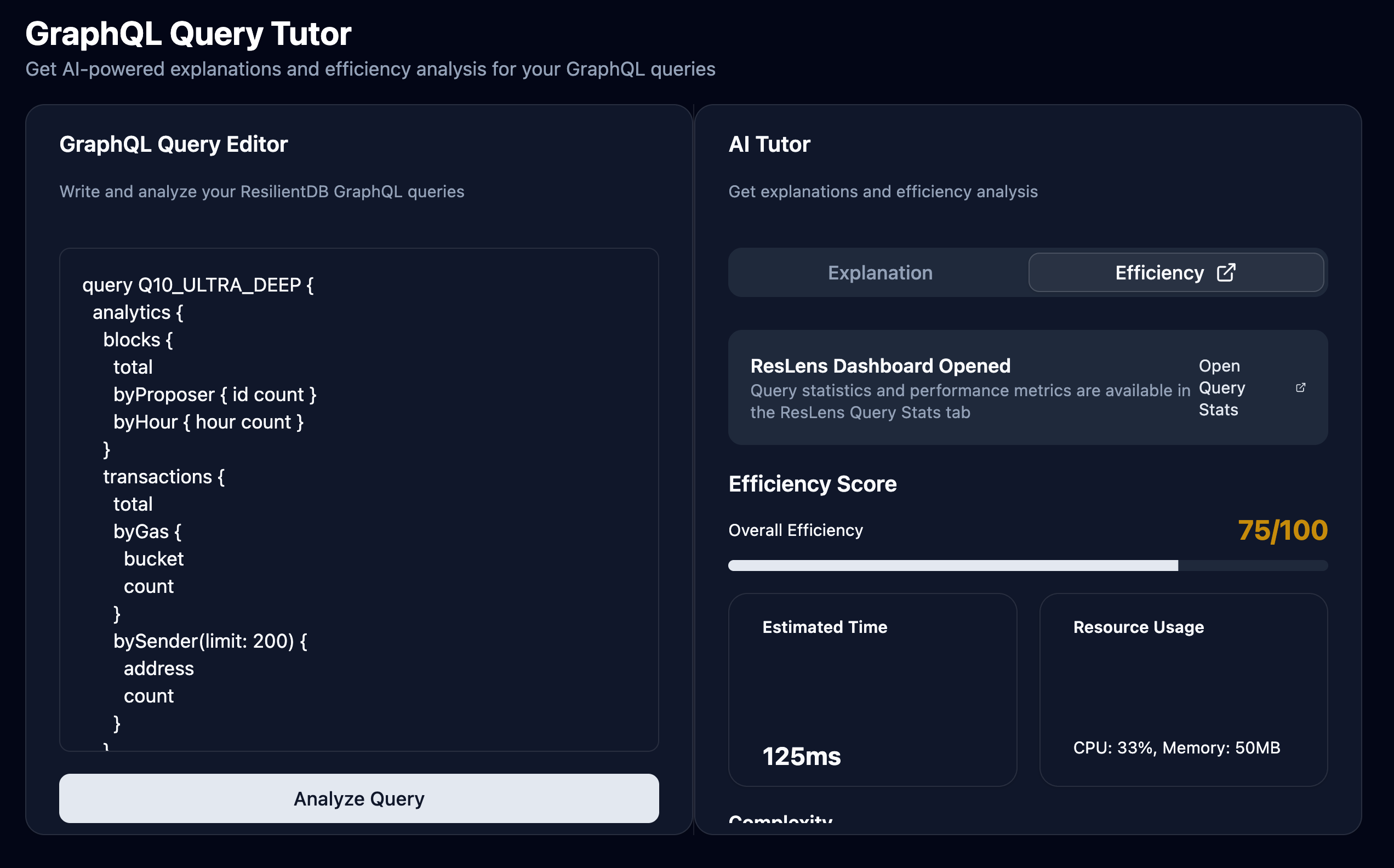
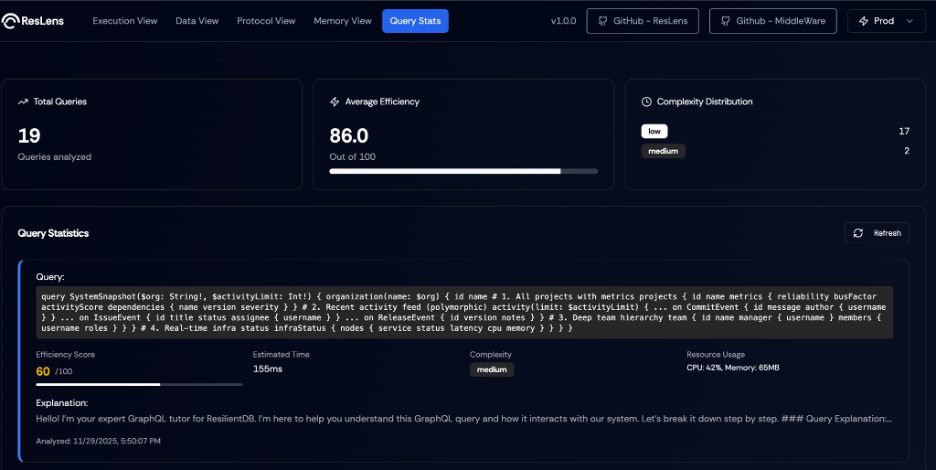
4. Performance Metrics
See efficiency scores, estimated execution times, and resource usage to understand query performance at a glance.
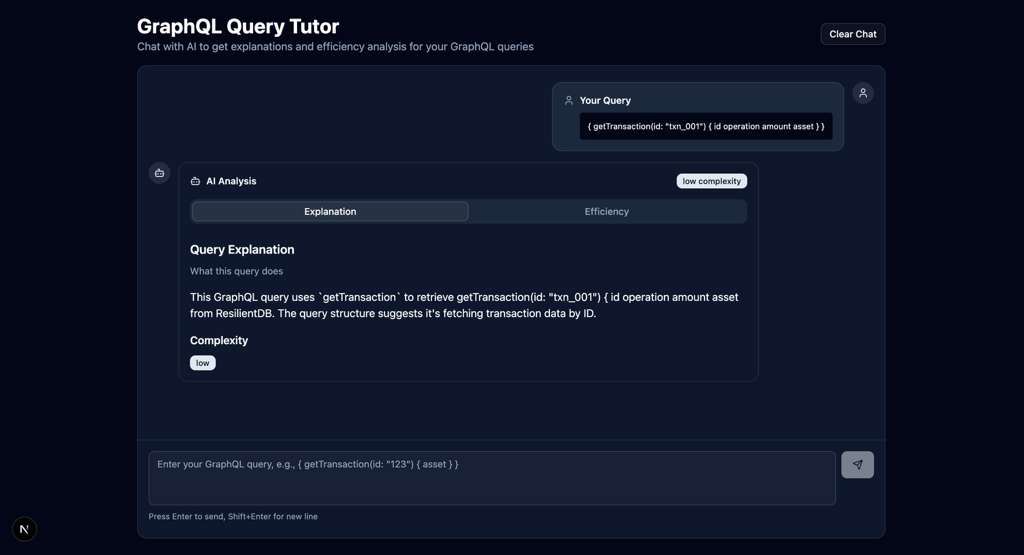
5. Chatbot Interface
Clean interface for interacting back and forth with the AI in a chat.
📦 Setup Overview
GraphQ-LLM is fully dockerized for easy deployment. Here’s what you need:
Prerequisites
- Docker & Docker Compose - For running all services
- Node.js 18+ - For local development (optional)
- Gemini API Key - For LLM capabilities (get from Google AI Studio)
- Nexus Repository - Separate Next.js frontend (use the forked version with GraphQ-LLM integration: sophiequynn/nexus)
- ResLens Repositories - Optional performance monitoring (use forked versions: sophiequynn/incubator-resilientdb-ResLens and sophiequynn/incubator-resilientdb-ResLens-Middleware)
Quick Start
- Clone and Install
git clone <graphq-llm-repo> cd graphq-llm npm install - Configure Environment
# Create .env file and add your Gemini API key LLM_PROVIDER=gemini LLM_API_KEY=your_gemini_api_key_here RESILIENTDB_GRAPHQL_URL=http://localhost:5001/graphql - Clone ResLens Forks (Optional - for performance monitoring)
# Clone ResLens Frontend
git clone https://github.com/sophiequynn/incubator-resilientdb-ResLens.git ResLens

# Clone ResLens Middleware
git clone https://github.com/sophiequynn/incubator-resilientdb-ResLens-Middleware.git ResLens-Middleware
Note: These forks include Dockerfile and configuration updates for GraphQ-LLM integration.
- Start Services with Docker
# Start ResilientDB (database + GraphQL server) docker-compose -f docker-compose.dev.yml up -d resilientdb # Start GraphQ-LLM Backend docker-compose -f docker-compose.dev.yml up -d graphq-llm-backend # (Optional) Start ResLens for performance monitoring docker-compose -f docker-compose.dev.yml up -d reslens-middleware reslens-frontend - Ingest Documentation
npm run ingest:graphql # This loads all GraphQL docs into ResilientDB for RAG - Set Up Nexus Frontend
- Clone the forked Nexus repository (includes GraphQ-LLM integration):
git clone https://github.com/sophiequynn/nexus.git cd nexus npm install - Note: This fork already includes all GraphQ-LLM integration files - no manual setup needed!
- Start with
npm run dev
- Clone the forked Nexus repository (includes GraphQ-LLM integration):
- Access the Tool
- Open
http://localhost:3000/graphql-tutorin your browser - Start querying or asking questions!
- Open
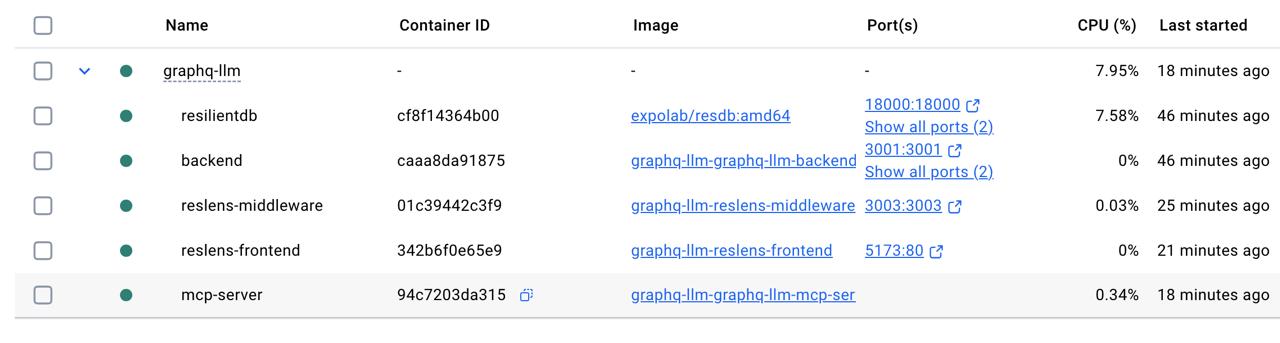
Service Architecture
All services run in Docker containers:
- ResilientDB (Port 18000, 5001) - Database with GraphQL server
- GraphQ-LLM Backend (Port 3001) - HTTP API for Nexus integration
- GraphQ-LLM MCP Server - For MCP client integration (stdio transport)
- ResLens Middleware (Port 3003) - Performance monitoring API (optional)
- ResLens Frontend (Port 5173) - Performance monitoring UI (optional)
💡 How It Helps Developers
Learning GraphQL
New to GraphQL? GraphQ-LLM explains:
- Query syntax and structure
- Field selection and arguments
- Mutations vs queries
- Schema exploration
- Best practices
Query Effeciency
Working on performance? Get:
- Complexity analysis
- Field selection recommendations
- Execution time estimates
- Resource usage insights
- Historical query comparisons (with ResLens)
Troubleshooting
Stuck on an error? The system helps:
- Understand query structure issues
- Find relevant documentation
- Compare with similar working queries
- Get optimization suggestions
🔧 Technology Stack
- Backend: Node.js/TypeScript with RAG architecture
- LLM: Gemini 2.5 Flash Lite (configurable: DeepSeek, OpenAI, Anthropic, Hugging Face, local models)
- Embeddings: Local (Xenova/all-MiniLM-L6-v2) or Hugging Face API
- Database: ResilientDB for vector storage and document chunks
- Frontend: Next.js (Nexus integration)
- Monitoring: ResLens for real-time performance metrics
- Protocol: MCP (Model Context Protocol) for secure AI tool integration
🌐 Integration with ResilientApp Ecosystem
GraphQ-LLM is designed to work seamlessly with:
- ResilientDB: The underlying blockchain database
- Nexus: The ResilientApp frontend platform
- ResLens: Performance monitoring and profiling tools
Together, these tools provide a complete development and monitoring experience for ResilientDB applications.
📚 Documentation & Resources
Complete setup instructions are available in:
- TEAM_SETUP.md - Step-by-step setup guide (includes Nexus fork setup)
- TEST_DOCKER_SERVICES.md - Service verification guide
- QUERY_TUTOR_EXAMPLES.md - Example queries and questions
- NEXUS_UI_EXTENSION_GUIDE.md - Frontend integration guide (reference only - fork already includes integration)
📦 Fork Information
GraphQ-LLM uses forked versions of external repositories that include GraphQ-LLM-specific modifications:
Nexus Fork
- Fork Repository: sophiequynn/nexus
- Original Repository: ResilientApp/nexus
- Integration Status: The fork includes all GraphQ-LLM UI components and API routes
- Setup: Simply clone the fork - no additional modifications needed!
ResLens Forks
- ResLens Frontend Fork: sophiequynn/incubator-resilientdb-ResLens
- ResLens Middleware Fork: sophiequynn/incubator-resilientdb-ResLens-Middleware
- Original Repository: Apache ResLens
- Integration Status: Forks include Dockerfile updates, additional routes (CpuPage, MemoryPage, QueryStats), and improved configuration
- Setup: Clone both forks - Docker Compose will use them automatically via absolute paths
🎓 Example Use Cases
Scenario 1: Learning GraphQL
Input:
"What is GraphQL and how do I write a basic query?"
Output: Comprehensive explanation with examples, documentation references, and links to relevant guides.
Scenario 2: Explaining a Query
Input:
{
  getTransaction(id: "abc123") {
    id
    asset
    amount
  }
}
Output:
- Detailed breakdown of what this query does
- Explanation of each field
- Expected response format
- Use cases and examples
Scenario 3: Optimizing Performance
Input:
{
  getTransaction(id: "test") {
    id version amount uri type publicKey signerPublicKey operation metadata asset
  }
}
Output:
- Efficiency score: 75/100
- Optimization suggestions: “Consider selecting only needed fields”
- Estimated execution time: 45ms
- Complexity: Medium
🎯 Conclusion
GraphQ-LLM bridges the gap between complex GraphQL documentation and practical query writing. By combining AI-powered explanations, semantic search, and performance monitoring, it provides developers with an intelligent assistant that makes learning and optimizing GraphQL queries effortless.
Whether you’re a GraphQL beginner or an experienced developer looking to optimize queries, GraphQ-LLM offers the insights and recommendations you need to write better, faster, and more efficient queries for ResilientDB.
Ready to get started? Follow the complete setup guide in TEAM_SETUP.md from our GitHub and begin exploring the power of AI-assisted GraphQL development in ResilientDB!
For detailed setup instructions, troubleshooting, and advanced configuration, see the complete documentation in the repository.